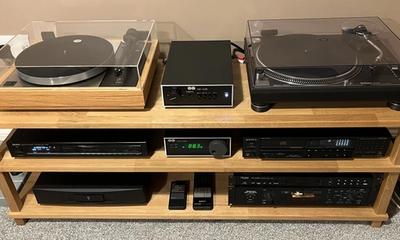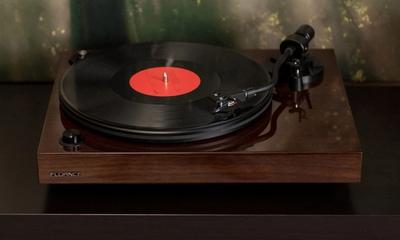


Most turntables arrive ready to play, but not ready to perform. That gap — between a deck that spins and a deck that actually extracts everything the groove has to offer — is what setup closes.
This guide is part of our Turntable 101 series — a free curriculum covering every concept, setup step, and spec you need to get the most from your vinyl rig.
Setup matters more than most new owners expect. A cartridge that is 2 mm off-angle, a tonearm under-weighted by half a gram, or a platter 1° off-level will all play music — but they will also wear your records, flatten the soundstage, and rob the system of detail you paid for. The good news: none of this is difficult.
What You’ll Need Before You Start
The Essential Three
A small bubble level — a dedicated turntable level like the Clearaudio Level It is purpose-built, but a cheap machinist’s level from Amazon is more accurate than most phone apps.
A digital stylus force gauge. The Ortofon DS-3 (~$40, ±0.01 g tolerance) is the most cited in press coverage; the Riverstone Audio gauge (~$18) is the budget standard; the discontinued Shure SFG-2 is still widely used in setup guides.
A cartridge alignment protractor. The Pro-Ject Align It DS2 (~$30) or MoFi GeoDisc (~$30) are the common commercial options. Vinyl Engine generates a free custom arc protractor once you input your tonearm’s pivot-to-spindle distance.
Nice to Have
Good lighting (you’ll be squinting at headshell screws) and a flat, stable surface to work on. Most setups don’t need the full list — if your turntable ships with a pre-mounted cartridge, the basics get you 90% of the way there.
Step 1 — Choose the Right Location
Keep It Away from the Speakers
The single biggest mistake is placing a deck on top of, or directly next to, the speakers. Bass energy travels through shelves and floors, re-enters the platter as vibration, and arrives at the stylus as audible distortion — a smeared low end and a constant low-level hash beneath the music.
Solid Surface vs Suspended Floor
A concrete slab floor is the ideal — effectively immovable. A suspended wooden floor is a different problem entirely: footfalls can flex the joists enough to make the stylus jump, especially on decks with compliant suspension (Linn LP12, Pro-Ject Classic, Rega Planar 3 on springy feet).
The realistic fix on a bouncy floor is a wall-mount shelf bolted into studs, or an isolation platform. The Townshend Seismic Pods use a damped mass-spring cell designed to isolate above 3 Hz; Sorbothane hemispheres (durometer 50–70) are a cheaper approximation.
Cable Routing Matters
Keep the power cable well away from the phono cables. A moving-magnet cartridge outputs 3–5 mV; a moving-coil outputs 0.2–0.5 mV. The phono stage applies 40–60 dB of gain to that signal — any mains-induced noise couples in and gets amplified by the same amount. A millivolt of hum becomes 100 mV of audible noise at the amp input. Cable separation is not optional.
Step 2 — Assemble the Platter and Belt
Remove Transit Hardware First
Check the box and plinth for transit screws, foam blocks, or cable ties. Their job is to lock the sub-chassis or motor during shipping. They absolutely must come out before the platter spins.
Pro-Ject Debut Carbon ships with a red plastic transit screw under the platter. Music Hall MMF series (MMF-2.3, MMF-5.3, MMF-7.3) have similar motor-lock screws. Rega Planar decks ship with foam pads under the plinth corners that must be removed. Higher-end suspended decks (Linn LP12, Avid) use transit screws locking the sub-chassis — leaving them in means the suspension does nothing.
Belt-Drive: Sub-Platter First
33⅓ RPM
Standard LP speed
Drop the inner sub-platter onto the spindle first. Loop the belt around the motor pulley — on most decks the upper groove is 33⅓ RPM and the lower groove is 45 RPM. Place the outer platter on top and give it a gentle spin by hand; the belt self-centres within a rotation or two.
The outer platter is the flywheel — its rotational inertia smooths micro-variations in motor torque. This is why heavier platters generally measure better on wow and flutter than light MDF platters on entry-level decks.
Direct-Drive: Drop and Go
The platter drops straight onto the spindle — the motor sits directly beneath and drives via the spindle itself. The Technics SL-1200’s quartz-locked servo motor is the gold standard: a crystal oscillator sets the reference and the motor control loop corrects deviations in real time. The current SL-1200G is specified at 0.025% wow and flutter (JIS C5521 weighted).
Finally, place the mat — felt, rubber, cork, or leather depending on the deck — on the platter surface.
Step 3 — Level the Turntable
How to Check
Remove the mat and place a level directly on the bare platter. Check the bubble in two perpendicular directions: front-to-back and left-to-right. Adjustable feet screw up or down until the bubble is centred in both axes.
How Close Is Close Enough?
Most digital levels read to 0.1°. Within ±0.3° of dead level is the practical target. A machinist’s level (~$15) is substantially more accurate than most phone accelerometer apps, which can drift by 0.5° between screen orientations.
Why It Matters
When the platter tilts, the stylus is no longer square in the groove — one channel’s wall presses harder than the other, producing channel imbalance and accelerated wear on one side of every record. At 1° of platter tilt, that error compounds with the geometric tracking error the pivoted tonearm already introduces.
Levelling also protects your anti-skate calibration — any lateral tilt creates a gravitational bias that throws off the arm’s balance.
Step 4 — Balance the Tonearm (Zero the Counterweight)
This is where most beginners go wrong, and it’s the step that matters most for record longevity. The goal: make the tonearm float weightlessly in mid-air, then apply a precise, measured downforce.
The Four-Step Process
1. Unlock the tonearm and swing it carefully over the platter. Keep the stylus guard on — one slip means a new stylus.
2. Slide the counterweight back and forth until the arm floats horizontally with no tendency to drift. A Rega RB330, Pro-Ject 9cc Evolution, or Ortofon TA-110 should hang in mid-air for several seconds. Immediate drift means either a stiff bearing (check transport locks) or a cartridge outside the tonearm’s stated mass range.
3. Without moving the counterweight body, rotate just the numbered dial on the front to read “0.” The dial spins independently. Then return the arm to its rest, lock it, and rotate the entire counterweight forward until the dial reads your cartridge’s recommended VTF. Typical values: Ortofon 2M Red 1.8 g, Audio-Technica VM95E 2.0 g, Nagaoka MP-110 1.8 g, Sumiko Rainier 2.0 g.
Different Arms, Different Systems
Rega (RB110–RB3000) uses a spring-loaded counterweight with no dial — you set tracking force on a separate sprung mechanism. Verifying with a gauge is essentially mandatory. Technics SL-1200’s numbered dial is factory-calibrated and tracks within 0.1 g of a gauge reading. Most Pro-Ject and Ortofon arms use the numbered-ring system.
Why the Dial Alone Isn’t Enough
Budget dial markings assume the cartridge sits at the exact design position in the headshell. If your cartridge sits even 2 mm off-centre — which happens whenever users align by Baerwald instead of Stevenson, or vice versa — the dial can be wrong by 0.3 g or more. The Ortofon DS-3 is factory-calibrated to ±0.01 g. If the cartridge costs more than the gauge, buy the gauge.
Step 5 — Set Anti-Skate
What Causes Skating Force
As a record plays, the tonearm wants to pull inward toward the spindle. This skating force comes from the headshell offset angle — the 22–24° bend that lets the stylus track a tangent to the groove. The Technics SL-1200G specifies a 22° offset; most Rega arms sit at roughly 23°. That offset creates a sideways torque at the stylus contact point, pulling inward.
Left uncorrected, the stylus presses harder on the inner groove wall (right channel) — uneven wear, elevated distortion on the right channel, and a stereo image that collapses to one side.
Setting It
Starting point: set anti-skate equal to tracking force. 2.0 g VTF → 2.0 on the anti-skate dial. The mechanism varies — rotating dial, slider, or a small gravity weight on a filament.
The equal-to-VTF rule is just a starting point. On a test record with a blank lead-out section (the Analogue Productions Hi-Fi Test Record and Cardas Frequency Sweep disc are the two most cited), correct anti-skate holds the stylus essentially motionless. Drift outward → too much. Drift inward → too little.
Budget Arms: Use 50–75%, Not 100%
Many budget turntables use a filament-and-weight mechanism that is mechanically imprecise — the Pro-Ject Debut series and U-Turn Orbit are the commonly-cited examples. The r/vinyl consensus: set these at 50–75% of tracking force. Matching VTF often applies more anti-skate than the arm needs, pulling the stylus outward.
Step 6 — Check VTA (Vertical Tracking Angle)
VTA and SRA: Two Angles, One Problem
VTA is the angle the tonearm tube makes with the record plane. SRA (Stylus Rake Angle) is the angle of the actual stylus contact facet. Lacquer cutter heads cut at an SRA of approximately 92° — just past vertical, leaning slightly back. Most cartridge manufacturers design their styli to read 92° SRA at their specified VTA.
What Goes Wrong When It’s Off
Tail-high (back of arm elevated) → SRA past 92° → brighter, more sibilant, leading edges exaggerated. Tail-low → SRA below 92° → darker, rolled-off treble, slower transients. Jonathan Carr of Lyra and Michael Fremer have both written that experienced listeners can hear ¼° of SRA change on a revealing cartridge.
The Practical Method
Put a record on the stationary platter, unlock the arm, and cue the stylus into a groove. Crouch to eye level and look from the side. The arm tube should run parallel to the record surface, or tilted very slightly tail-up. This “parallel arm” method is adequate for 95% of setups.
The precise method requires a USB microscope to measure SRA directly. A 1 mm change in tonearm height changes VTA by approximately 0.6° on a standard 9″ arm. On a $150 cartridge with a spherical or elliptical stylus, the microscope rig delivers diminishing returns.
The Rega Exception
No Rega tonearm from the RB110 to the RB3000 offers VTA adjustment. Rega’s founder Roy Gandy argues that the maximum realistic pillar adjustment only shifts VTA by about 1°, and that making the arm-base adjustable compromises the mechanical rigidity that matters more. The pragmatic fix for Rega users is an aftermarket spacer ring — Rega sells them in 2/4/6/8 mm increments; SRM Tech and Acoustic Signature also make them.
Step 7 — Install or Check Cartridge Alignment
For most new owners the cartridge arrives pre-aligned — this step is a visual confirmation. Alignment becomes essential when you replace a cartridge or move one between headshells.
What Alignment Actually Is
A pivoted tonearm traces an arc across the record, but grooves are cut by a lathe moving in a straight line. These two geometries only agree at two specific radii — null points — where the stylus is exactly tangent to the groove. The job of alignment is to position the cartridge so those null points fall where your chosen geometry says they should.
The Three Geometries
Baerwald (Löfgren A) — null points at 66.0 mm and 120.9 mm. Minimises peak distortion. The most common factory default, used by the MoFi GeoDisc and most generic two-point protractors.
Löfgren B — null points at 70.3 mm and 116.6 mm. Minimises total RMS distortion averaged across the record, at the cost of slightly higher distortion at the very start and end.
Stevenson — null points at 60.325 mm and 117.42 mm. Minimises inner-groove distortion specifically — chosen because side-endings often contain the emotional climax of a track. Rega tonearms and most Japanese direct-drive arms are designed for Stevenson. Using a Baerwald protractor on a Rega gives an alignment that looks correct but places the cartridge forward of Rega’s design position.

The Tools
Free: Vinyl Engine’s custom arc protractor generator — input your pivot-to-spindle distance, choose a geometry, print on cardstock. ~$30: Pro-Ject Align It DS2 or MoFi GeoDisc — Baerwald-only, universal. ~$60+: Dr. Feickert Universal Protractor — multi-geometry, mirrored surface for azimuth.
The Process
Place the protractor on the platter over the spindle, lower the stylus onto each null point in turn, and check whether the cartridge body is square to the grid at both points. Loosen the two headshell screws just enough to slide, nudge into alignment, re-tighten. Adjust one null and recheck the other — they always disturb each other on the first few iterations. Patience matters more than skill.
Headshell Wiring Colours
White → L+ (left positive). Blue → L− (left negative). Red → R+ (right positive). Green → R− (right negative). Some older cartridges use black for L− and yellow for R− — always check the cartridge body. Swapping + and − on one channel inverts absolute phase on that channel: the result is a hollow, out-of-phase sound where centred vocals smear across the soundstage.
Azimuth
Azimuth is the left-right rotation of the cartridge body as viewed from the front. It should sit perfectly perpendicular to the record. A mirrored protractor makes this visible: look at the cartridge and its reflection from the front — any kink at the mirror means azimuth is off. Most cartridges ship with azimuth correctly set; it rarely needs adjustment unless the cantilever is visibly crooked.
Step 8 — Connect to Your Phono Stage or Amplifier
RCA Cables and the PHONO/LINE Switch
RCA cables are colour-coded: red is right, white or black is left. Plug them into the matching inputs on the phono stage or amplifier.
The PHONO/LINE switch selects whether the deck outputs a raw cartridge signal (PHONO — needs an external phono stage) or a line-level signal with RIAA correction already applied (LINE — plugs into any AUX input). Rule: dedicated phono input on your amp → set to PHONO. No phono input → set to LINE. Getting this wrong produces either faint tinny audio (phono into line) or loud distorted noise (line into phono).
What RIAA Equalization Actually Is
During mastering, bass below 1 kHz is attenuated by up to 20 dB at 20 Hz, and treble above 1 kHz is boosted by up to 20 dB at 20 kHz. Without this the groove excursions for bass would be unplayably wide, and treble would be buried in surface noise. The phono stage applies the exact inverse curve to restore flat response. This is why a phono signal fed into a line input sounds thin and bright — you’re hearing the raw cutting curve.
The Ground Wire
Connect the thin bare wire (spade or fork lug) to the ground post on your phono stage or amp. The ground wire is not the signal ground — the RCA shields handle that. Its job is to equalise the chassis potential between the turntable and the phono stage, preventing a ground potential difference from inducing 60 Hz hum.
When you do NOT need a ground wire: turntables with built-in phono stages (Rega Planar 1, Pro-Ject T1, Fluance RT81) handle ground internally. Adding an external ground wire on these can create a ground loop — two paths to earth forming a loop antenna — and add hum rather than remove it.
Step 9 — Verify Speed
How Audible Is Speed Error?
33⅓ RPM
Standard LP speed
Records are cut at 33⅓ RPM for LPs, 45 RPM for singles, and 78 RPM for shellac. A 0.5% speed error on a 440 Hz concert A produces 442 Hz — roughly 8.7 cents sharp. Most listeners detect pitch errors of 2–3 cents on sustained tones with a reference; trained ears and absolute-pitch listeners catch 0.5% easily on piano or sustained vocals.
How to Check
Strobe disc under household lighting (50 Hz or 60 Hz depending on region) — the dot pattern should appear stationary. Drifting forward → fast; backward → slow.
0.05%
Flutter threshold for quality decks
Smartphone apps: the free RPM Speed & Wow (iOS and Android) uses the phone’s accelerometer balanced on the platter, accurate to about ±0.05% on modern phones. Hardware option: the KAB SpeedStrobe ($35) is the classic LED strobe used by reviewers.
Wow and Flutter — What the Specs Mean
Wow is slow speed variation below 6 Hz — audible as pitch drift on piano and sustained strings. Flutter is fast variation above 6 Hz — audible as a roughening of timbre and smearing of transients. Both measured as weighted RMS percent under DIN or IEC. A competent belt-drive measures 0.05–0.10%; the Technics SL-1200G is specified at 0.025% WRMS (JIS C5521). Cassette tape ran at around 0.15% — audibly worse than any modern turntable in good condition.
If Speed Is Off
On belt-drive: check the belt first. Stretched, twisted, or slipping belts are by far the most common cause. Belts are consumables; budget for replacement every 2–5 years. On direct-drive: speed is quartz-locked and should not drift; if it does, the motor control board is a service item, not a setup one.
Common Misconceptions About Turntable Setup
MYTH
“You only need to set up a turntable once.”
Every cartridge change requires re-balancing the tonearm from zero and resetting tracking force. Moving the deck means re-checking level and all connections. Good setup isn’t set-and-forget. Reality: it’s a 10-minute revisit whenever something changes.
MYTH
“Higher tracking force protects records.”
Too-high VTF presses the stylus deeper than the cutter intended, damaging groove walls and accelerating stylus wear simultaneously. The manufacturer’s range exists for a reason. Reality: above range is actively harmful, not safe.
Two More Worth Busting
“Anti-skate is optional.” Without it, the stylus presses harder on the inner groove wall (right channel) throughout every record. Sibilance distortion rises toward the inner grooves, the right channel wears faster, and the stereo image collapses. Reality: 10 seconds to set, saves measurable record wear.
“If it sounds OK, the setup is fine.” A slightly misaligned cartridge or 0.3 g wrong tracking force often sounds fine in casual listening — until you’ve played a favourite record for a year and notice it sounds duller than it used to. The damage is cumulative and invisible. Reality: verify with tools, not ears alone.
Frequently Asked Questions
Do I need a digital stylus force gauge?
For casual setups the counterweight dial is close enough to get playing. The consensus across setup guides is that a digital gauge ($18–50) gives precision the dial alone can’t match — dial markings on budget turntables are often off by 0.2–0.4 g. If the cartridge costs more than the gauge, buy the gauge.
Should I use the dial or a digital gauge?
Both. Use the dial to get into the rough window quickly, then verify with the gauge. Any discrepancy means either the cartridge isn’t at the design position on the headshell, or the dial isn’t factory-accurate. The gauge reading is the one that matters.
What is azimuth and do I need to adjust it?
Azimuth is the left-right rotation of the cartridge body as viewed from the front. Most cartridges ship with it correctly set. The check is a mirrored protractor: cartridge body and its reflection should form a straight vertical line with no kink at the mirror. Adjustment is only needed if the cantilever is visibly crooked.
My new cartridge sounds thin and bright. What’s wrong?
Almost certainly the PHONO/LINE switch is set wrong, or the turntable is plugged into a line-level input with the switch in PHONO. The thin, bass-light, treble-forward sound is the unequalized RIAA curve — you’re hearing the raw cutting curve, not corrected playback. This is the single most common “new setup sounds wrong” cause.
How often should I check my setup?
Every cartridge or stylus change, without exception. After any move or significant vibration event. Otherwise, once a year is sensible: verify tracking force, confirm the cartridge is square, check the deck is still level.
My turntable hums. What’s wrong?
Almost always the ground wire. Check it’s firmly attached at both ends. Still humming? Check phono cables aren’t running parallel to a power cable. Also check the PHONO/LINE switch. If your turntable has an internal phono stage and you’ve connected a separate external ground, try disconnecting it — you may have created a ground loop.
Can I play records without setting up the tonearm properly?
Technically yes. In practice, wrong tracking force wears records and stylus significantly faster. Too light: the stylus skips and mistrack, gouging groove walls. Too heavy: drags the stylus deeper than the groove was cut for. Tonearm balance and tracking force are the single most important thing you can do for record longevity.
What’s the difference between a built-in phono stage and a separate one?
A built-in phono stage is convenient and fine for most beginners. A separate stage typically offers better power supply isolation, lower noise floor, and more control over gain and cartridge loading (47 kΩ for MM, variable for MC). Entry-level setups under $1,000 combined rarely benefit meaningfully from a separate unit; mid-level setups usually do.
Put this into practice
Ready to apply what you just learned? These guides will help you make a smarter buying decision.